
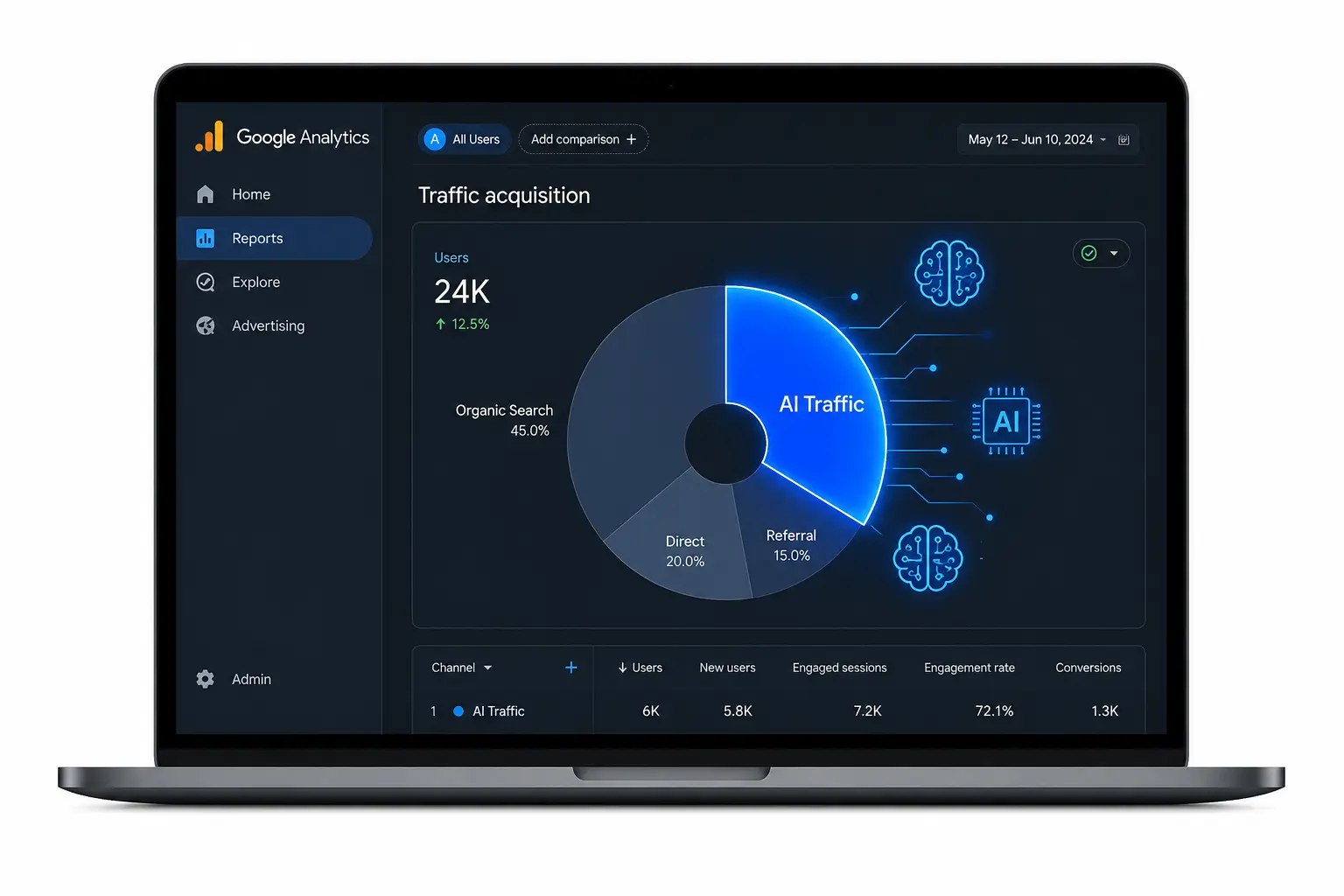
GA4 does not create a separate channel for AI traffic. Every visit from ChatGPT, Perplexity, or Claude lands inside your referral bucket or disappears into direct traffic entirely. A custom channel group fixes this how to track AI traffic in GA4 in under ten minutes.
According to WebFX’s analysis of 2.3 billion sessions (January 2024 to December 2025), AI referral traffic grew 796% in two years and converts 1.2x higher than organic search. This article covers the three-step GA4 setup, which platforms actually pass referral data, and two advanced tactics your analytics dashboard is currently missing.
Why GA4 Does Not Show AI Traffic by Default
GA4 was not built for AI referrals. It groups them under the existing referral channel alongside random websites, forums, and partner links.
But there is a second problem most guides skip. Not all traffic showing up from AI domains is real human traffic. Bot crawlers from AI companies also hit your pages constantly.
Real AI referral traffic has “referral” as the medium and shows normal engagement metrics. Bot traffic shows zero engaged sessions, a 0% engagement rate, and zero seconds of average engagement time. If you see those numbers next to an AI domain in your data, that is a crawler, not a visitor.
Which AI Platforms Actually Pass Referral Data?
This is where most GA4 guides get it wrong. They assume all AI platforms track the same way. They do not.
ChatGPT on free accounts passes referral data properly through its source links. But paid ChatGPT accounts use a no-referrer attribute on in-content links. Those visits are invisible to GA4.
Claude passes referral data correctly. Perplexity tracks on the web version but not on its desktop app. Copilot tracks on the web but not on Windows. Grok passes no referral data at all.
The practical takeaway: whatever number GA4 shows you for AI traffic is an undercount. The real number is higher. Use the data to understand trends and direction, not exact volume.
How to Set Up a Custom AI Channel Group in GA4 (Step by Step)
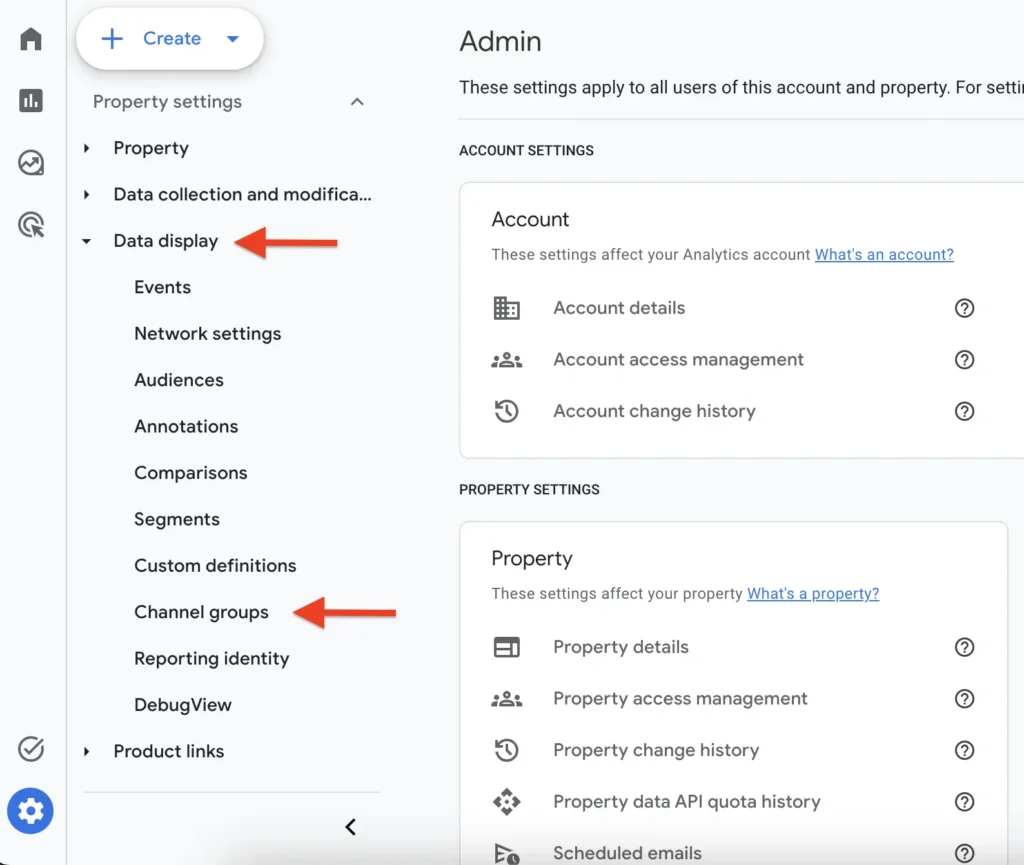
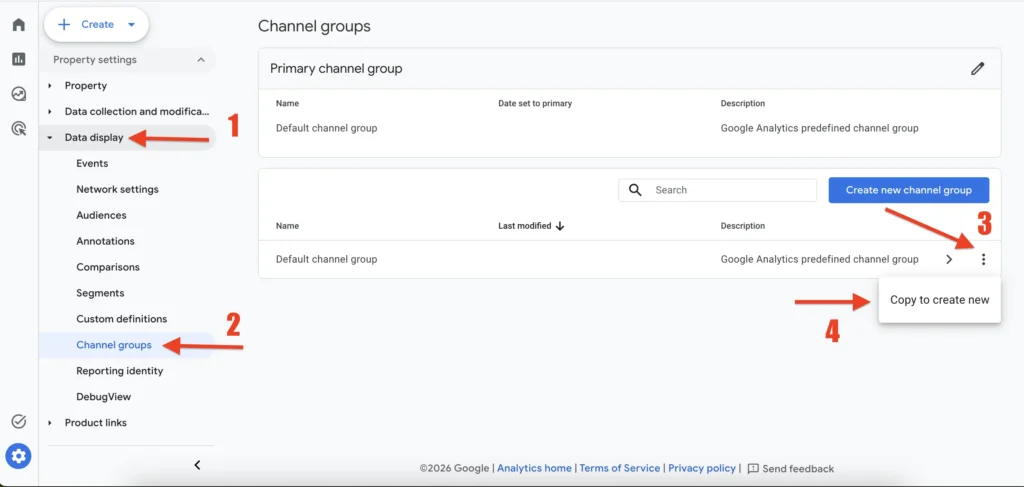
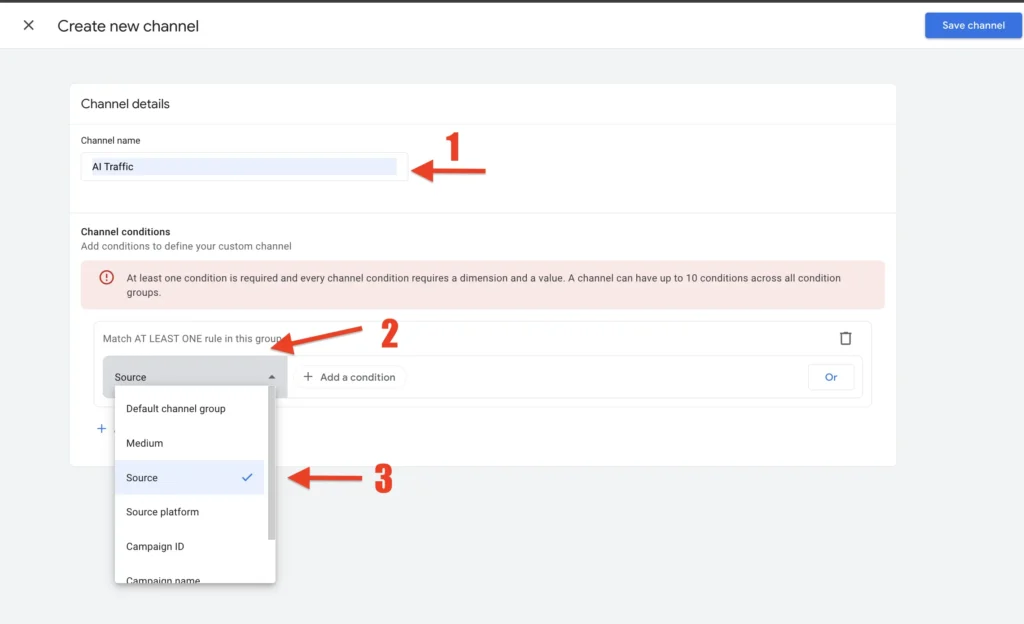
Open GA4 and go to Admin. Under Data Display, click Channel Groups. Click “Create new channel group.”
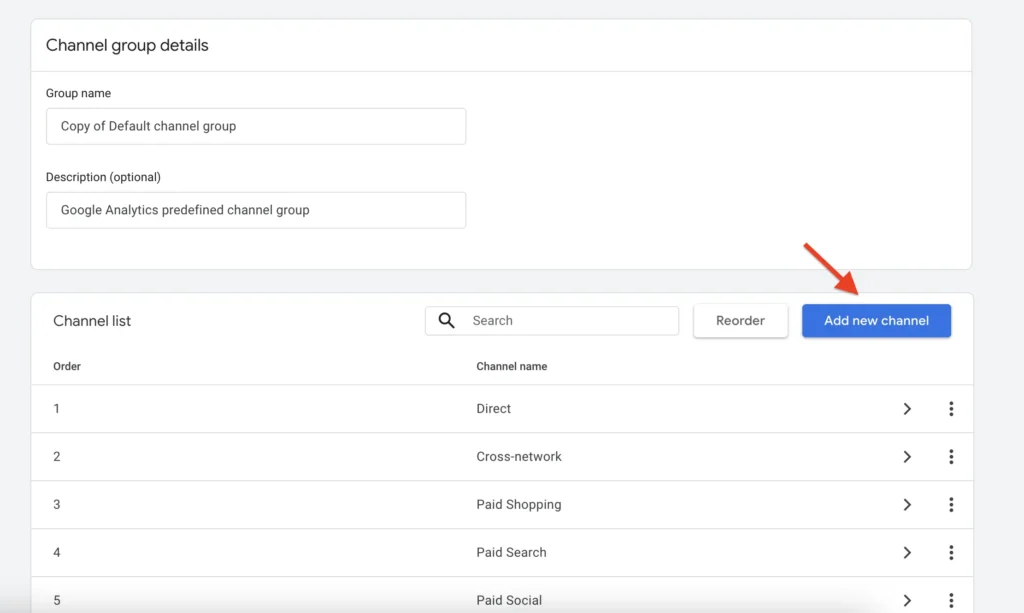
Name the new channel group something clear, like “AI Traffic Tracking.” Inside it, create a new channel. Name that channel “AI Traffic.”
Set the condition to Session Source, matches regex, then paste this:
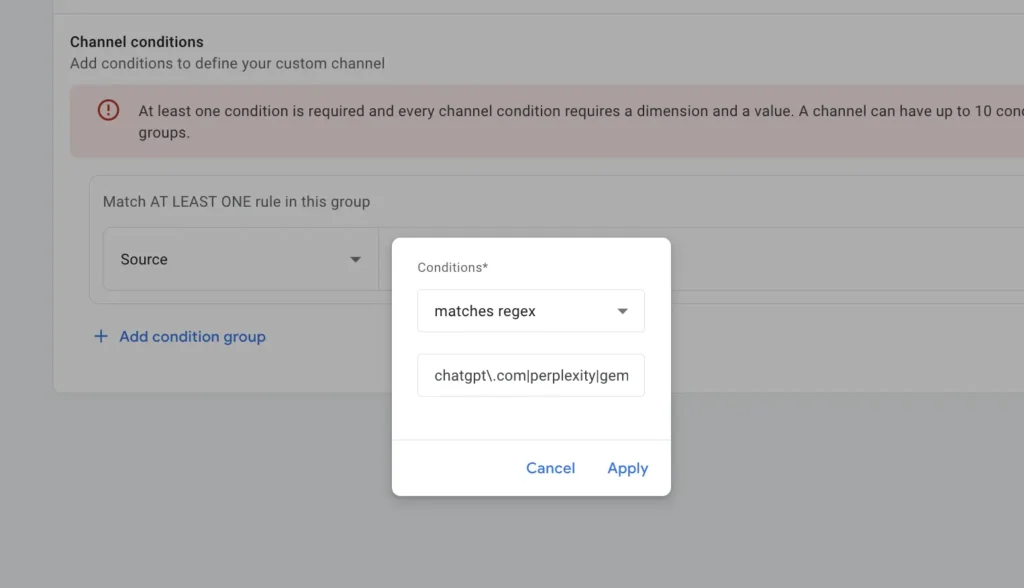
chatgpt\.com|chat\.openai\.com|perplexity\.ai|claude\.ai|gemini\.google\.com|copilot\.microsoft\.com|grok\.com|x\.ai|deepseek\.com|meta\.aiAfter saving the channel, scroll down to reorder it. Drag your new AI Traffic channel above the Referral channel. This step is critical. GA4 assigns traffic to channels in the order they appear. If Referral sits above AI Traffic, your AI visits will still be categorized as standard referral.
Click Apply, then Save.
One important detail: channel groups in GA4 are retroactive. The moment you save, your historical data updates automatically. You do not need to wait for new traffic to come in.
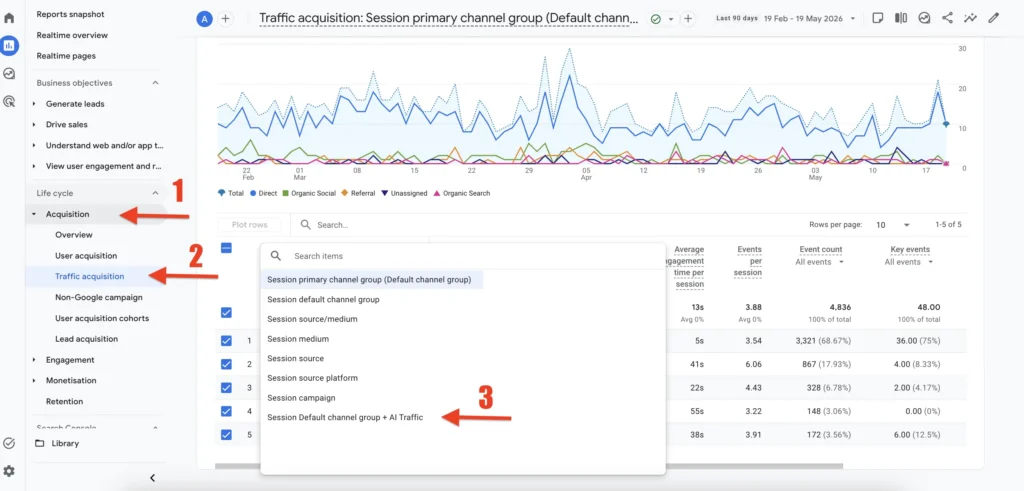
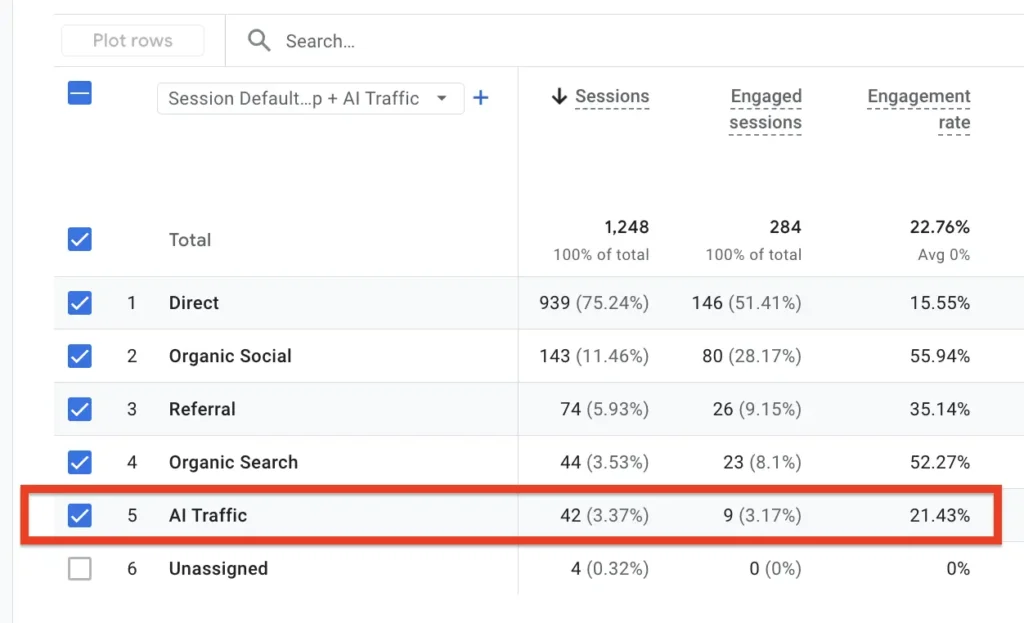
To view your data, go to Reports, then Acquisition, then Traffic Acquisition. Switch your channel group to the new one you just created.
What to Do After You Set Up AI Tracking
Most guides stop at the setup. Here is what actually matters after.
Look at which pages are already receiving AI traffic. These are the pages AI tools are recommending right now. Keep them updated, accurate, and focused. A page getting AI referrals that has not been touched in a year will stop getting them.
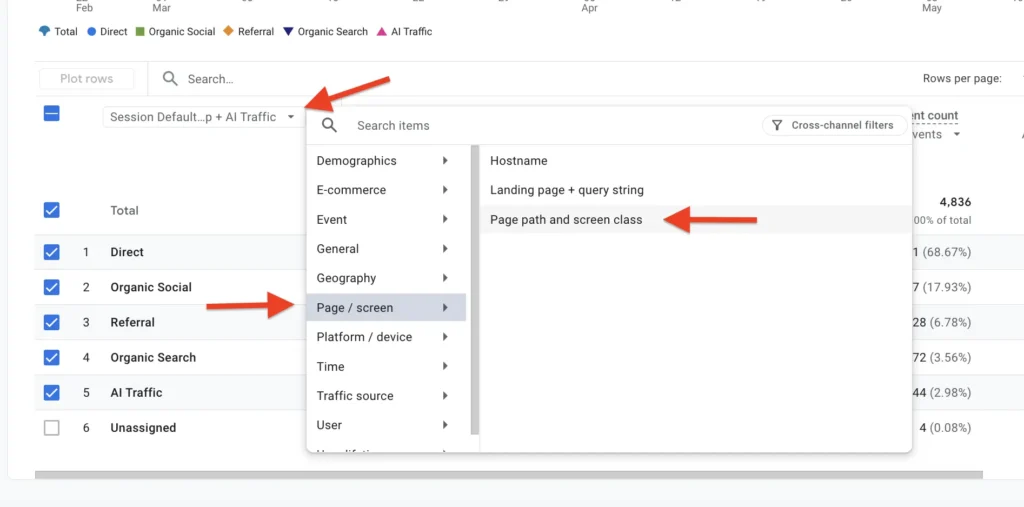
Then look at your important pages that show zero AI traffic. A key service page or a high-value blog post getting ignored by AI tools is a signal worth investigating. It could be a content structure issue, a crawlability issue, or simply a topic AI has not connected to your site yet.
Compare your AI traffic conversion rate against your organic search conversion rate inside GA4. AI-referred visitors often arrive further along in their decision. If they are landing on pages without a clear next step, you are losing that intent advantage.
The Hidden AI Traffic Problem: Dark Traffic
Here is the part your GA4 setup cannot solve on its own.
A significant portion of AI-influenced visits never appear as AI referrals. Someone asks ChatGPT for a recommendation. ChatGPT mentions your brand. That person closes the chat, opens a new tab, and types your brand name into Google. GA4 attributes that visit to branded organic search, not ChatGPT.
This happens at scale. The result is that your AI traffic data in GA4 represents only the visitors who clicked a link directly from the AI platform. Everyone who was influenced by AI but navigated independently is invisible.
The fix is simple. Add a “How did you hear about us?” question to your contact form, signup flow, or post-purchase survey. Include options like ChatGPT, Perplexity, Google AI Overviews, and AI assistant. Ahrefs implemented this and found that 3% of their conversions in 2025 came from AI, based entirely on self-reported data they would never have seen in GA4 alone.
Is AI Traffic Worth Tracking? The Conversion Data
The honest answer is yes, but with one important caveat.
Semrush analyzed over 500 high-value topics in June 2025 and found that AI-referred visitors convert 4.4x higher than organic search visitors. Seer Interactive’s case study found ChatGPT converting at 15.9% compared to Google Organic at 1.76%. WebFX’s 2.3 billion session study found AI traffic converting 1.2x higher than organic across all industries.
The caveat: AI traffic is still 0.18% of total web sessions. Organic and direct traffic together account for 63%. AI is not replacing organic search. It is adding a high-intent layer on top of it.
The right approach is not to choose between SEO and AEO. Strong SEO signals help AI citation probability. Good AEO content improves organic rankings. Optimize both simultaneously.
FAQ
Does GA4 automatically track AI traffic separately?
GA4 does not have a built-in AI traffic channel by default. All AI referral visits land inside the standard Referral channel unless you create a custom channel group with a regex that identifies AI platform domains. The setup takes under ten minutes and applies retroactively to your historical data. However, this only captures clicks where the AI platform passes referral data, which not all platforms do.
Which AI platforms send the most referral traffic to websites?
ChatGPT is currently the largest AI referrer, accounting for 82.6% of all generative AI referral traffic in 2025 according to WebFX data. Perplexity and Google Gemini follow at significantly smaller shares. Grok sends no trackable referral traffic at all because it strips referral data entirely before passing the visit to your site.
Why does my GA4 show AI traffic under Direct instead of Referral?
This happens when the AI platform uses a no-referrer attribute on its outbound links. ChatGPT paid accounts do this for in-content links. When no referrer is passed, GA4 has no way to identify the source and defaults to Direct. The only way to capture this influence is through self-reported attribution, such as a “How did you hear about us?” question on your forms.
How often should I update the AI regex in my GA4 channel group?
Review and update your regex every two to three months. New AI platforms launch regularly and existing platforms change their domain structure. A regex that was comprehensive in early 2025 may miss traffic from platforms that launched or expanded since then. Set a calendar reminder and cross-reference your Session Source report for unfamiliar domains.
Does setting up AI traffic tracking in GA4 require coding skills?
No coding is required. The setup uses GA4’s built-in channel group interface and a regex pattern you paste in directly. Regex looks technical but you are copying a pre-written pattern, not writing one from scratch. ChatGPT or Claude can generate an updated regex for you if new platforms need to be added.
Is tracking AI traffic relevant for Pakistani websites and businesses?
Yes, and it is more relevant than most Pakistani SEOs currently realize. ChatGPT, Perplexity, and Google Gemini are actively used in Pakistan for research and recommendations. If your content appears in their answers, those visitors arrive with a higher purchase intent than typical organic visitors. Setting up AI traffic tracking now gives you a baseline before AI referrals grow large enough that everyone starts paying attention.
Start Tracking Before the Data Gets Loud
Open GA4 right now. Go to Admin, find Channel Groups under Data Display, and build the channel. It takes ten minutes. The channel group is retroactive, so you will have historical data the moment you save it.
AI traffic is a small slice of your total sessions today. But these are the visitors who have already decided. They were researching, comparing, and narrowing their options inside an AI tool before they ever clicked your link. That is a different kind of visitor entirely, and they deserve their own row in your analytics.